
Which Jobber report shows profit by client? A map of Jobber's reports
The short answer
No Jobber report shows profit by client. Jobber has 28 reports, and not one of them does. The One-off jobs report shows profit for each one-off job. For recurring clients, Jobber AI (the stars icon next to the search box) gets closest: it ranked my clients by revenue per tracked hour, and it gave me a profit margin for each client's recurring job over the last 30 days. It could not give me profit by client over a year.
I expected to find a report I had overlooked. I went through the whole Reports page in a Jobber test account on Nov 24, 2026, and then put four questions to Jobber AI. What follows is what I found, including where the AI corrected itself.
On this page: Which report answers which question · All 28 reports · Sales report · Financial reports · How to run reports · Profit by job · Jobber AI · What it can't do yet · Custom reports · Doing it yourself
A note on the account: it is a free trial (Jobber shows it as "In Trial"). Jobber AI called it a Core plan, yet it also gave me job costing figures, which Jobber lists under Grow and Plus; so a trial seems to open more than Core does, and what you see on your plan may differ.
Jobber reports: which one answers which money question
Jobber groups its reports into financial reports, work reports, client reports, one expense report and one account report. Here are the money questions owners ask most, and where each answer lives.
| Your question | Report | Group |
|---|---|---|
| What did I bill? | Invoices | Financial |
| What was paid or deposited? | Transaction list | Financial |
| Who owes me, and how late is it? | Aged receivables, Client balance summary | Financial |
| What is still coming in? | Projected income | Financial |
| How much tax did I collect? | Taxation | Financial |
| Did a one-off job make money? | One-off jobs (with job costing) | Work |
| What does each visit bring in, and how long did it take? | Visits | Work |
| How many hours did my team track? | Timesheets, Team productivity | Work |
| Which services do I sell most? | Products & Services | Work |
| Which quotes turn into jobs, by salesperson? | Salesperson performance | Work |
| Which lead sources bring revenue? | Lead source | Client |
| What did I spend? | Expenses | Expense |
| Profit by client? | No report | |
| A profit and loss statement? | No report |
All 28 Jobber reports
This is the full Reports page as I found it on Nov 24, 2026.
| Report | Group | What it shows |
|---|---|---|
| Projected income | Financial | Money expected from invoices awaiting payment |
| Transaction list | Financial | Invoices, payments and deposits |
| Invoices | Financial | Every invoice, with client details |
| Taxation | Financial | Tax collected and still to collect, by tax rate |
| Aged receivables | Financial | Invoices that are 30, 60 and 90 or more days late |
| Bad debt | Financial | Invoices marked as bad debt |
| Client balance summary | Financial | What each client owes or has in credit |
| Client balance summary (Legacy) | Financial | The older version of the same report |
| Visits | Work | Every visit, with its price and times |
| One-off jobs | Work | One-off jobs; with job costing, their costs and profit |
| Recurring jobs | Work | Recurring jobs with client and billing details |
| Requests | Work | Requests and assessments |
| Checklists | Work | Checklist answers |
| Quotes | Work | Quotes, with client details |
| Team productivity | Work | Productivity numbers for each team member |
| Salesperson performance | Work | Quote conversion for each salesperson |
| Products & Services | Work | How often each product or service is used on quotes, jobs and invoices |
| Waypoints | Work | GPS waypoints logged |
| Timesheets | Work | All time the team tracked |
| Expenses | Expense | Tracked expenses |
| Clients | Client | All clients and the lead channel they came from |
| Lead source | Client | Revenue by lead source |
| Client communications | Client | Emails sent through Jobber |
| Job follow-up emails | Client | Follow-up emails sent after jobs |
| Client contact info | Client | Clients with their contact details |
| Property list | Client | All properties |
| Client re-engagement | Client | Clients with no closed job in the past 12 months |
| Delete log | Account | Deleted clients, quotes, jobs, invoices and other records |
Does Jobber have a sales report?
Not by that name. Three reports cover what owners usually mean by it: the Invoices report (what you billed), the Transaction list (what you collected) and Salesperson performance (which quotes each salesperson turned into jobs). For sales by source, use Lead source.
Jobber financial reports
Jobber has seven financial reports: Projected income, Transaction list, Invoices, Taxation, Aged receivables, Bad debt and Client balance summary (an older version of the last one sits under Legacy reports). They cover what you billed, what you collected and what you are owed. None of them shows costs, so there is no profit and loss report; my Jobber profit margin guide covers where to get one.
Of the 28 reports, 26 had a download button when I checked. The button has a different name depending on the report, which I list in how to export data from Jobber.
How to run reports in Jobber
Reports run in the browser at jobber.com, under Insights in the side menu.
- Sign in at jobber.com on a computer.
- In the side menu, select Insights, then Reports.
- Pick the report. They are listed under Financial reports, Work reports, Expense reports, Client reports and Account reports.
- Set the date range and the filters at the top. On the job reports, check which date the range applies to (for example the date a job was created versus the dates of its visits).
- Select Columns to add or remove columns.
- Download it if you want to work in a spreadsheet. The button is called Export on some reports and Receive Excel Copy on others.
Jobber says reports are available on select plans and to admins, or to team members with the report permissions (Jobber Help, Reports). If a team member can't see prices or costs in a report, that's a permission and not a bug.
Profit by job: the One-off jobs report
The One-off jobs report is the only report with profit in it. With job costing in use (Jobber lists it on the Grow and Plus plans, per Jobber Help, Job costing), the Columns list gains seven costing columns: expenses, time tracked, labor cost, line item cost, total costs, profit and profit % (Jobber Help, One-off jobs report).
It is one row per job. You can filter it to a single client, so for a client with a handful of one-off jobs you can read their profit off the screen or add it up from the download.
That stops working for recurring clients. Jobber's help page for the Recurring jobs report says it plainly: "Job costing data is not available in the recurring jobs report" (Jobber Help, Recurring jobs report). A recurring job does carry a profit box when you open it, labeled "30 day average profit margin". You see it one job at a time.
For how that margin is calculated and what it leaves out, see my Jobber profit margin guide.
Can Jobber AI show profit by client?
Jobber AI is the stars icon next to the search box (it carries a Beta label). You type a question and it answers from your account's data. I asked it four things.
1. "Which clients bring in the most revenue compared to the hours we spend on their jobs?"
It ranked the eight clients in my test account for Jan 1 to Nov 24, 2026.
| Client | Revenue per logged hour | Revenue | Hours logged |
|---|---|---|---|
| Testclient Two | $205.93 | $540 | 2.62 |
| Testclient Four | $162.20 | $1,495 | 9.22 |
| TestClient One | $121.44 | $1,440 | 11.86 |
| Testclient Three | $121.19 | $1,095 | 9.04 |
| Testclient Nine | $106.45 | $165 | 1.55 |
| Testclient Five | $100.60 | $330 | 3.28 |
| Testclient Ten | $79.07 | $440 | 5.56 |
| Testclient Six | $76.34 | $605 | 7.93 |
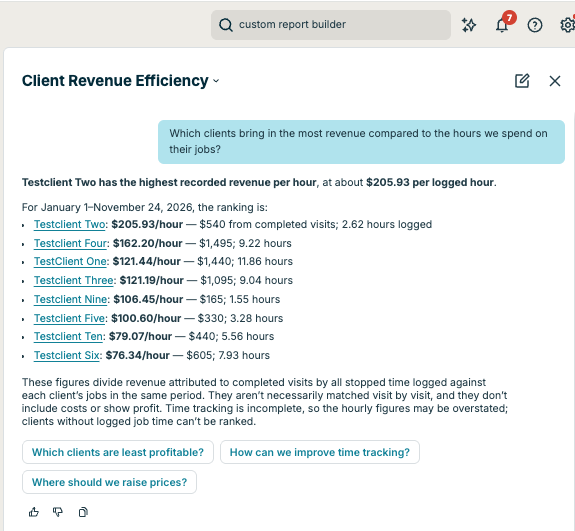
That is a useful ranking, and I got it in under a minute. It is revenue per visit hour, though (only the hours tracked on a client's jobs; no drive time and no general time). In its own words, the figures "don't include costs or show profit".
I asked the same question again later in a new chat. Seven of the eight lines came back identical. The eighth, Testclient Four, had moved to $165.67 because I had completed another visit for that client in between. So the answer was repeatable.
2. "Which clients are least profitable?"
This time it used job costing. It named the three lowest margins, each with revenue, cost and profit: Testclient Six at 74.8% ($605 revenue, $152.46 cost), Testclient Five at 75.1% and Testclient Ten at 76.6%. It added that these figures cover the 30 days ending Nov 24, that the recorded costs are labor only, and that the revenue is Jobber's job costing revenue, "not necessarily amounts invoiced or collected". As with the ranking, non-visit hours (drive time, general time) are not in this calculation.
3. Profit and margin by client for the last 12 months, recurring jobs included
It declined: "The available recurring-job profitability figures cover only the most recent 30 days." Then it corrected its previous answer. The margins it had just given me were for each client's recurring job, not for all of that client's jobs, and they "shouldn't be treated as client-wide".
4. Do the hours include drive time, and is the revenue what I invoiced?
No on both. It counted only timesheet entries linked to a client's job; general and drive time entries that weren't linked to a job were left out. The revenue was what Jobber attributes to completed visits, "not a sum of invoices or payments".
What Jobber AI can't do yet
Jobber AI was honest about its limits; every one below comes from its own answers in my test. If you run a recurring book, these are the gaps between its ranking and a number you can price from.
| What's missing | What I saw | Why it matters |
|---|---|---|
| Profit over more than 30 days | Recurring job profitability covers only the most recent 30 days | For a weekly client that is four or five visits; one long visit moves the margin a lot |
| A client-wide profit figure | The margin is for the client's recurring job, not all their jobs | A client with a recurring job and extra one-off work shows only part of the picture |
| Drive time | Only time linked to a job is counted | Two clients at the same price can sit 2 or 18 minutes from the stop before |
| General time | Left out with the drive time | Paid hours that belong to no single client are not spread across clients |
| What you invoiced | Revenue is what Jobber attributes to completed visits | If you changed a job's price, past visits can show today's price (my test) |
| Costs beyond labor | "No line-item or expense costs appear" on my jobs | Supplies and equipment count only if you enter them on the job |
| Clients without tracked time | "Clients without logged job time can't be ranked" | A crew that forgets timers makes a client disappear, or look better than they are |
| A report you can save | Saving needs the Custom Report Builder (Plus plan) | On other plans you ask again each time |
The drive time gap is the one I'd watch most. In my test account, Driving and General entries carry no job number at all (how to get drive time per client out of Jobber), so neither the reports nor the AI can hand them to a client.
One more caution, from the panel itself: "Jobber AI can make mistakes. Double check important info." It did correct itself once in four questions with me.
Jobber custom reports
Jobber's answer to "I need a report that doesn't exist" is the Custom Report Builder. You describe the report to Jobber AI in plain words, and it builds one from your quotes, jobs, invoices and timesheets, saves it to a Custom Reports page and refreshes it with your latest numbers. That description is Jobber's, from its community announcement; one of its example prompts is the question I asked above.
It needs the Plus plan. I could not test it: when I asked Jobber AI to save my ranking to my list of reports, it answered, "Custom Report Builder isn't available on your Core plan; it requires Plus."
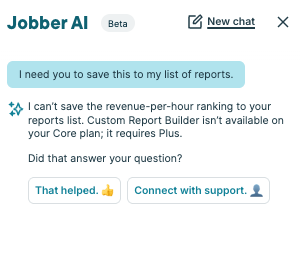
So I can't tell you whether a saved custom report gets past the limits in the table above. Nothing in my test suggests it would, since the 30 days and the job-linked hours come from the data behind the answers. If you are on Plus and have tried it, I'd like to hear what you got.
Without the builder, you still have two ways to shape a report: the Columns button on each report, and the download.
Getting to a per-client number yourself
You have three routes, from quickest to most complete.
- Ask Jobber AI. Use the two questions above. You get a ranking in a minute, good enough to spot a client who is far below the rest. Read it with the limits in mind: 30 days of profit, job-linked hours only.
- Build it from the exports. Download the Visits, Timesheets and Invoices reports for 12 months (how to export data from Jobber) and divide what you billed each client by the hours their visits took, drive time included. My revenue per labor hour guide walks through it; for 100 recurring clients it takes about an evening, and most of that goes into drive minutes.
- Let WellPriced do the exports for you. The audit reads four Jobber exports (Visits, Recurring jobs, Timesheets and Invoices), uses what you invoiced over the last 12 months, gives each visit its share of the drives, and ranks every recurring client with enough tracked visits.
A limit on my side: WellPriced doesn't take your wages, so it shows revenue per labor hour and not profit. I think that is the better number for pricing a route (it tells you what an hour of crew time earns at each client), but it is not a profit and loss by client either.
If you only want to check one client or one bid, the free revenue per labor hour calculator does it in the browser.
Questions owners ask
Which Jobber report shows profit by client?
None of the 28 reports does. The One-off jobs report shows profit per one-off job and can be filtered to one client. For recurring clients, Jobber AI can give a 30-day margin for each client's recurring job.
Does Jobber have a sales report?
Not by that name. Use the Invoices report for what you billed, the Transaction list for what you collected, and Salesperson performance for quotes won by each salesperson.
What financial reports does Jobber have?
Projected income, Transaction list, Invoices, Taxation, Aged receivables, Bad debt and Client balance summary. There is no profit and loss report.
How do I run reports in Jobber?
Sign in at jobber.com on a computer, select Insights and then Reports, pick the report, and set the date range and filters. Use Columns to change what it shows.
Can I build custom reports in Jobber?
On the Plus plan, with the Custom Report Builder: you describe the report and Jobber AI builds and saves it. On other plans you can change a report's columns and download it.
Can Jobber AI show profit by client?
Partly. In my test it gave margin, revenue, cost and profit per client for the last 30 days, based on each client's recurring job. It declined to do it for 12 months.
Does the Recurring jobs report include profit?
No. Jobber's help page says job costing data is not available in that report.
Does Jobber's client ranking include drive time?
No. Jobber AI told me it counted only time linked to a client's job and left out drive and general time that wasn't.
Where are reports in Jobber?
In the side menu under Insights, then Reports, when you are signed in at jobber.com on a computer.
How many reports does Jobber have?
I counted 28 on the Reports page on Nov 24, 2026: 8 financial (one of them a legacy version), 11 work, 7 client, 1 expense and 1 account report.
What is the Jobber Custom Report Builder?
A Plus plan feature. You describe a report to Jobber AI in plain words, and it builds and saves the report. I could not test it on my account.
More Jobber how-tos
- How to raise the price of a recurring job in Jobber (without rewriting your history)
- Scheduled versus tracked time in Jobber: how to find the visits that run long
- Does Jobber count drive time per client? Where it sits and how to assign it
- How to export your data from Jobber: clients, jobs, visits, invoices and timesheets
- Jobber profit margin: where to find it, and what it leaves out
Sources
- Jobber Help, Reports
- Jobber Help, One-off jobs report
- Jobber Help, Recurring jobs report
- Jobber Help, Job costing
- Jobber Community, Insights and reporting (Custom Report Builder announcement)
WellPriced isn't affiliated with or endorsed by Jobber. Screens, labels and Jobber AI's answers are as I found them on Nov 24, 2026, and may change.